System Design & Computer Networks 101 — Part 2: DNS and Domain Name Resolution
📘 System Design & Computer Networks 101
This post is part of a beginner-friendly series that builds strong fundamentals in system design and computer networks from MVP thinking to large-scale distributed systems.
You are reading: Part 2 of 7
📚 Series Roadmap
This series will progress step by step:
DNS and Domain Name Resolution ← you are here
Server Infrastructure and Database Design
Vertical vs Horizontal Scaling
Load Balancing and Service Discovery
Advanced Load Balancing and Routing
Domain Registration, DNS Management, and HLD Philosophy
The Core Problem 🎯
When building distributed systems, we face a fundamental challenge: machines communicate via IP addresses, but humans work with domain names. Understanding how this translation happens at scale reveals critical system design principles about bottlenecks, caching, and fault tolerance.
IP Addresses: The Foundation
Every device connected to the internet has an IP address. Direct IP-based communication is possible:
http://142.250.185.46 → Google’s serverKey insight: Domain names are abstraction layers. The underlying internet operates entirely on IP addresses.
Security consideration: Direct IP access can be blocked. Services like CloudFront reject direct IP connections as a security measure, forcing clients through proper domain resolution paths.
The Human-Machine Interface Gap 🧠
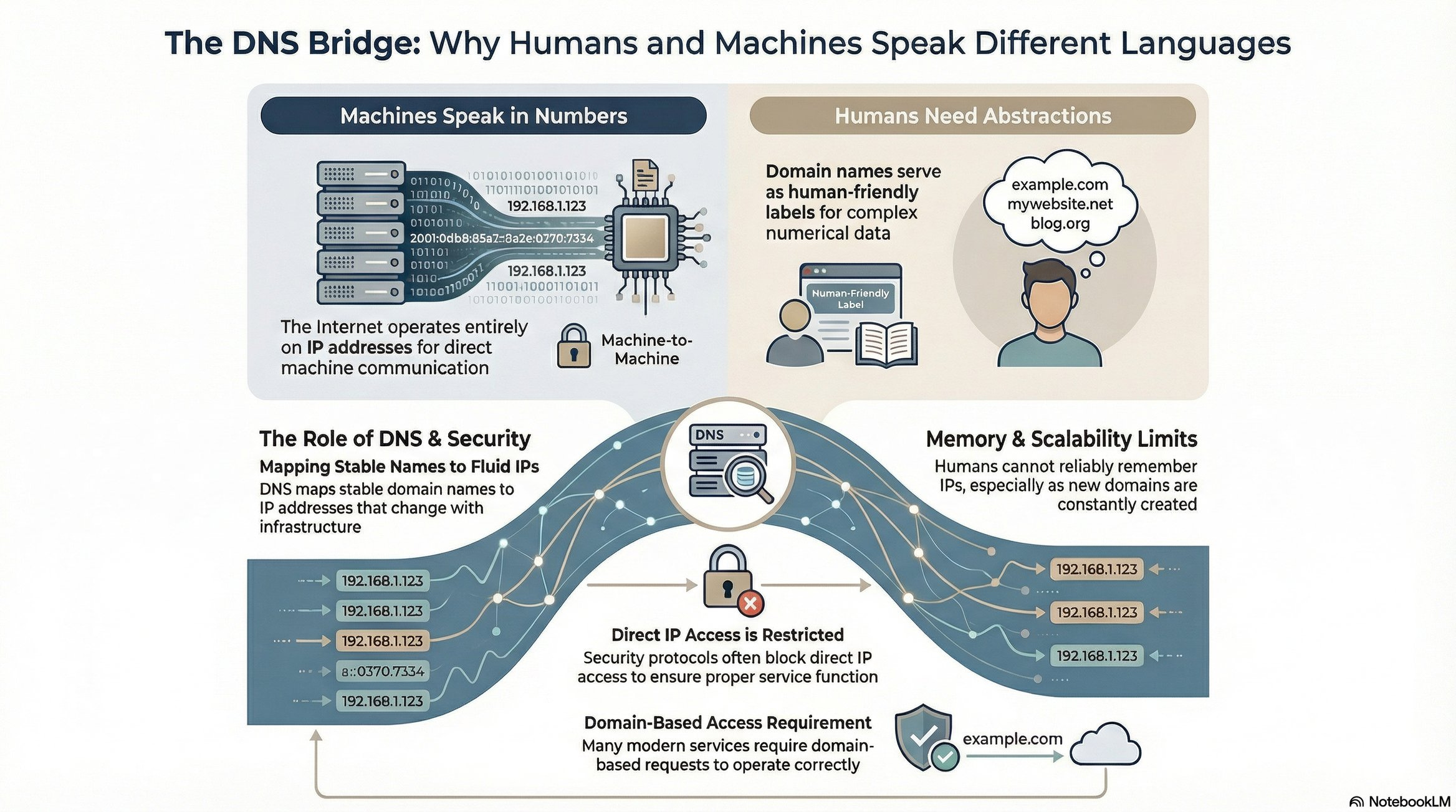
IP addresses are machine-readable but not human-friendly. Consider:
Can you remember IPs for 50+ frequently visited sites? No.
Do IPs change when infrastructure updates? Yes.
Are new domains created constantly? Yes.
This necessitates a mapping system: domain name → IP address
DNS: Domain Name System 📡
DNS functions as a distributed directory service. When you request example.com:
Browser needs the IP address
Browser queries DNS infrastructure
DNS returns the mapped IP
Browser connects to that IP
Server responds with content
ICANN: The Central Authority 👑
ICANN (Internet Corporation for Assigned Names and Numbers) is the authoritative source for domain-to-IP mappings globally.
Domain registration flow:
Purchase domain through registrar (GoDaddy, Cloudflare, etc.)
Registrar submits mapping to ICANN
ICANN updates authoritative records
Domain becomes resolvable
Note: Registrars are brokers. ICANN is the source of truth.
Domain ownership: First-come, first-served. Once owned, domains are tradable assets (Premium domains sell for millions).
The Architectural Problem: Scale and Fragility ⚠️
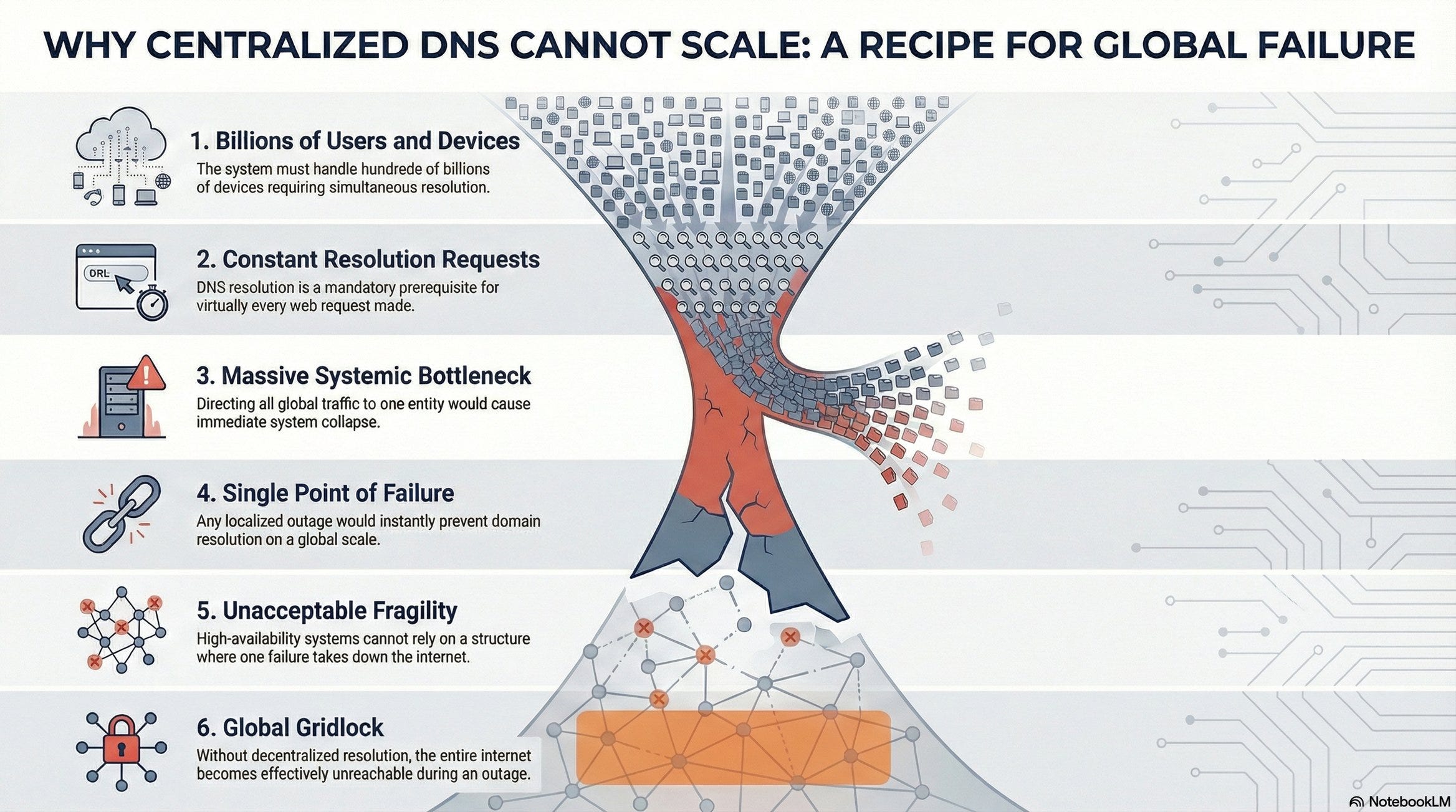
Consider the naive approach - all DNS queries hit ICANN directly:
Scale:
5+ billion internet users
100+ billion connected devices
Every web request requires domain resolution
Problem #1 - Bottleneck 🍾
ICANN servers become a choke point. Billions of concurrent requests for IP resolution would overwhelm any centralized system, causing severe latency and throughput degradation.
Problem #2 - Single Point of Failure 💥
If ICANN’s infrastructure fails, global DNS resolution stops. No domain names resolve. The internet effectively goes down. This is architecturally unacceptable for a system requiring five nines (99.999%) availability.
The Central Design Challenge 🤔
We need:
✅ Centralized authority for domain ownership (ICANN)
❌ Cannot have all queries hitting central servers
How do we resolve this contradiction?
The solution involves distributed caching, hierarchical DNS architecture, and TTL-based invalidation strategies.
The Solution: Hierarchical DNS Architecture 🧅
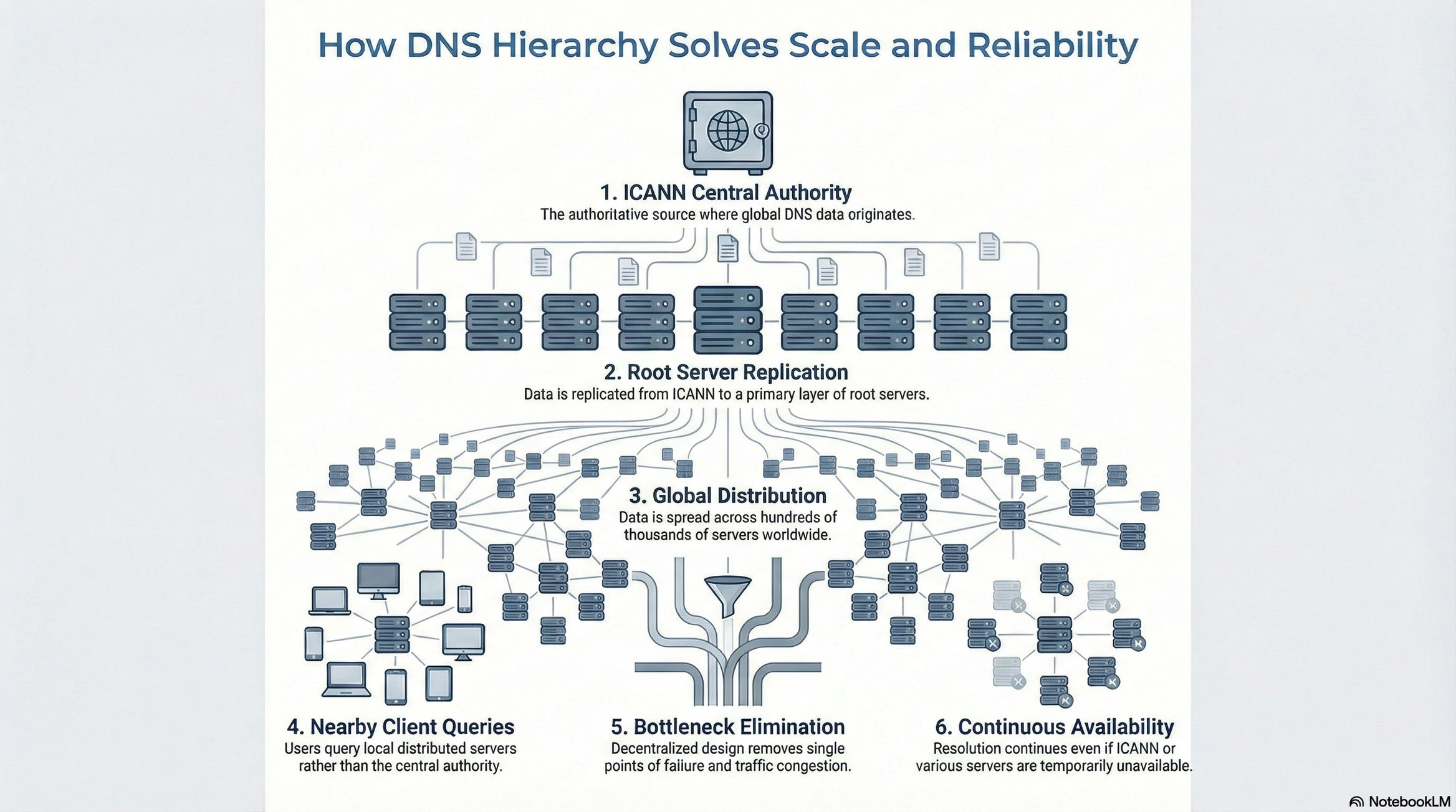
Rather than direct ICANN queries, DNS uses a multi-tier architecture:
Architecture layers:
ICANN: Authoritative source (top of hierarchy)
Root DNS Servers: 7 primary servers maintaining complete ICANN database replicas
Lower-tier DNS Servers: Hundreds of thousands of distributed servers worldwide
Key principle: Clients query distributed DNS servers, not ICANN directly.
Eliminating Single Point of Failure 💪
Scenario 1: ICANN outage
Impact: None on resolution
Reason: Distributed DNS servers have cached/replicated data
Result: Internet continues functioning
Scenario 2: Multiple DNS server failures
Impact: Minimal
Reason: Hundreds of thousands of servers globally
Result: Traffic routes to available servers
The distribution eliminates bottlenecks and single points of failure simultaneously.
DNS Caching: Performance at Every Layer ⚡
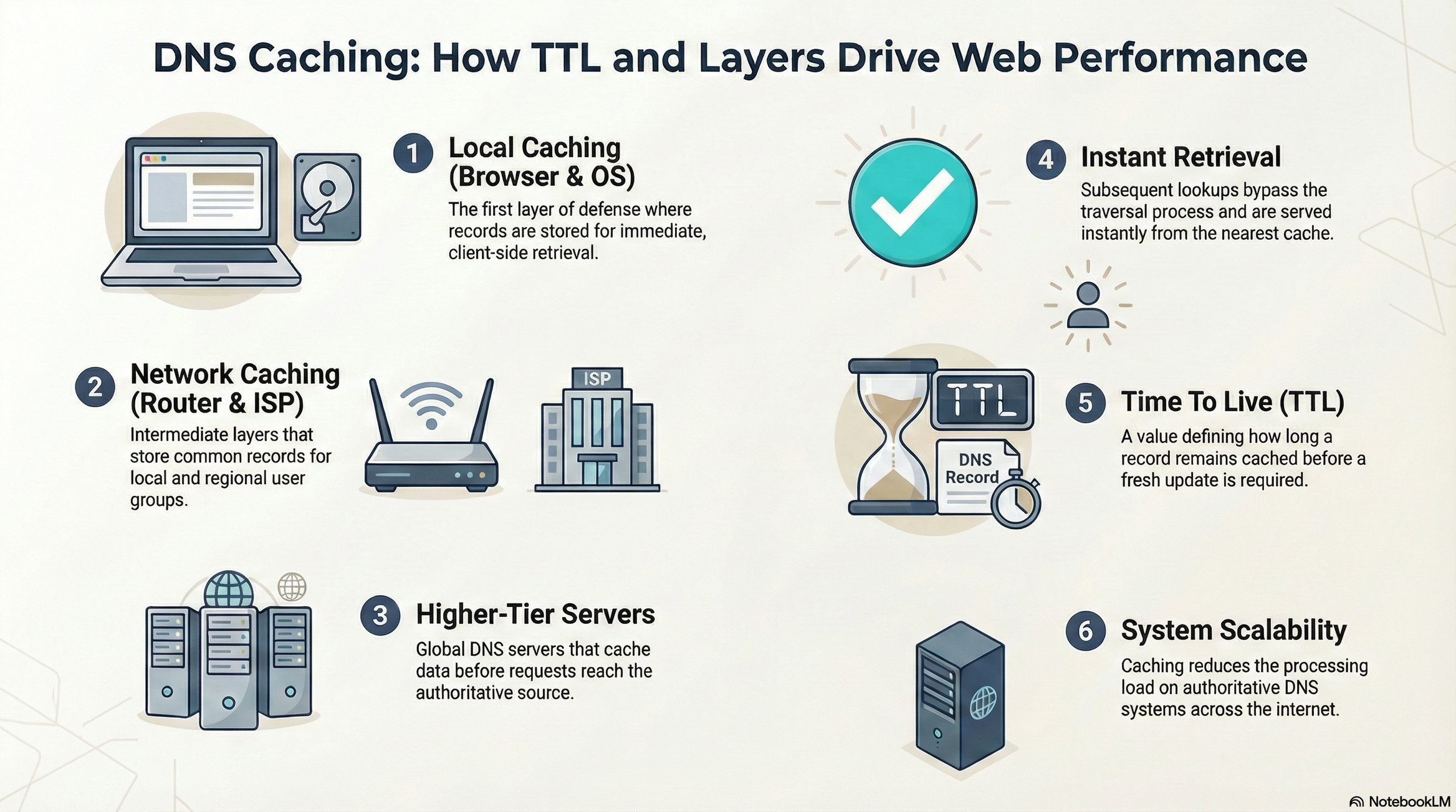
Caching occurs at multiple levels:
✅ Local machine (browser/OS cache)
✅ Router cache
✅ ISP DNS server cache
✅ Higher-tier DNS servers
✅ Root DNS servers
Impact: First query requires full DNS resolution. Subsequent queries hit cache effectively instantaneous.
TTL (Time To Live): Cache entries expire based on configured TTL, ensuring eventual consistency when IP mappings change.
DNS Server Maintenance: Who and Why 💰
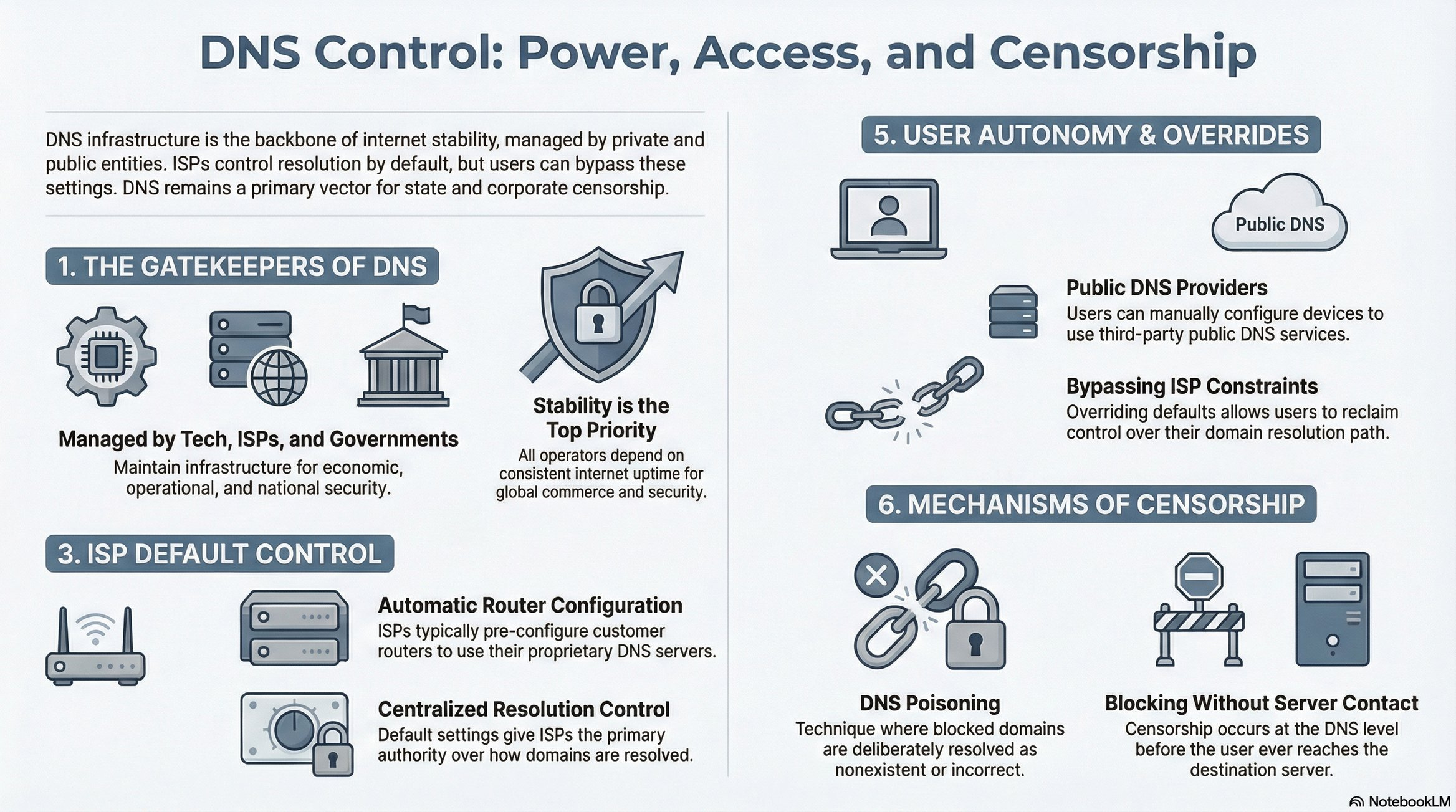
Organizations maintaining DNS infrastructure:
1. Tech Giants (Google, Cloudflare)
Internet downtime = revenue loss (millions per minute)
Vested interest in stability and performance
Operate public DNS servers (8.8.8.8, 1.1.1.1)
2. Governments
National security concerns
Economic stability requirements
Communication infrastructure dependencies
3. ISPs (Internet Service Providers)
Customer service quality (slow DNS = complaints)
Control over user traffic routing
Default DNS configuration for customers
ISP DNS Control and Override 🔧
Default behavior:
ISPs automatically configure routers to use their DNS servers
Users typically unaware of this configuration
ISP controls resolution by default
Custom DNS configuration: Users can override ISP DNS by manually configuring:
Google Public DNS: 8.8.8.8, 8.8.4.4
Cloudflare DNS: 1.1.1.1
Other public DNS providers
DNS-Based Censorship 😈
How ISPs Block Websites
Method: DNS Poisoning
Example: ISP blocks example.com
ISP operates custom DNS server
ISP’s DNS database:
example.com → "Does not exist"User queries: “What’s the IP for example.com?”
ISP DNS responds: “Unknown domain”
User perspective: Website doesn’t exist
Workaround: Use public DNS (8.8.8.8) to bypass ISP censorship. Public DNS returns actual IP address.
Note: DNS poisoning is one method among several for website blocking. Other methods include IP-based blocking and deep packet inspection.
Performance Impact of DNS
Slow DNS = Slow Internet (First Load)
Resolution flow:
User visits new domain
Browser queries DNS (latency depends on DNS server response time)
DNS returns IP
Browser connects to actual server
If DNS response is slow (seconds vs milliseconds), every new domain feels slow. Cached domains remain fast, but first-load experience degrades.
Case Study: Delicious at Scale 🚀
Complete Infrastructure Flow
Setup:
Joshua deploys web server on personal laptop
Acquires internet connection (ISP → Router → Laptop)
Purchases
delicious.comfrom domain registrarRegistrar submits mapping to ICANN
DNS servers worldwide update:
delicious.com → Joshua's laptop IP
User access flow:
User types delicious.com in browser
Browser queries DNS server
DNS returns Joshua’s laptop IP address
Browser establishes TCP connection to laptop
Web server responds with content
User sees Delicious homepage
The Viral Growth Problem ⚠️
Initial scale: 50-100 users (manageable on laptop)
Growth trajectory: Word spreads → millions of users
Critical constraint: Delicious runs on a personal laptop (not enterprise hardware)
2003 hardware context:
Consumer laptops: ~128 MB RAM (megabytes, not gigabytes)
Limited CPU
Limited storage
Single machine running 24/7
The architectural crisis:
Millions of daily requests
Exponential traffic growth
Single laptop as bottleneck
No redundancy, no failover
The fundamental problem: A single consumer laptop cannot handle viral-scale traffic. The architecture must evolve from single-server to distributed infrastructure.
Key Takeaways 💡
Human abstractions hide machine complexity.
Centralized authority ≠ centralized traffic.
Scale turns correctness into an availability problem.
Caching is the real hero of the internet.
TTL is a tradeoff, not a bug.
Single points of failure are architectural red flag.
Infrastructure evolves after success, not before.
First-load latency defines user perception.
Control planes shape power.
Always design for 100× growth even if you don’t need it yet.
This article was originally published on Substack.
Read on Substack